
Pay Advice for Terminated Employees

User Instructions for Terminated Employees to retrieve a Pay Advice
Step 1 – Log In
1. Open the EzyTime Portal. Refer back to your previous employer if you are unsure of the URL.
2. Enter your Payroll ID and Password.

3. If you have forgotten your password, click Password Reset on the login page and follow the prompts to reset it. The email address in the portal must be your personal email. If you are not receiving the reset information and have checked junk and spam contact the bureau on payroll@paymasters.co.nz

Step 2 – Open Pay Advice
- After logging in, the Dashboard will display.
- Select Pay Advice from the available options.

Step 3 – To View a Pay Advice
- Locate the required Pay Advice.
- Click View at the end of the row to view the Pay Advice online.

Step 4 – To Download or Print a Pay Advice
- Click the BLUE Pay Advice # for the Pay Advice you require.

-
Select Print.

- Do not select "Create PDF", as this function is not available for terminated employees.
Step 5 – Print or Save as PDF
To Print:
- Select your printer.
- Click Print.
To Save to Your Computer:
- Change the Destination to Save as PDF.
-
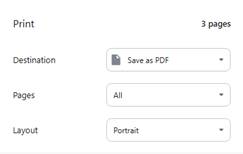
- Click the blue Save button.
- Select the folder where the report is to be saved.
- Click Save.
Outcome: Pay Advice successfully viewed, printed, or saved as a PDF.
